For dealerships · automotive, powersports, RV, marine & equipment
Run your dealership from one system.
Sales, service, and marketing share one $99 user seat — built for desktops, tablets, and phones across the lot and service lane. Add the public website, extra rooftops, or six human-approved AI agents.
Modules
Every user seat includes lifetime Customer & Unit Files, two-way SMS and call logs, a unified appointment calendar, master search, tasks, payments, and full phone & tablet access.
$99 per user, each month
Sales Module
Sales Module takes a buyer from first inquiry to funded delivery — on desktop, showroom tablet, or lot phone — with lead routing, major-unit inventory, PIN-protected Quick Quotes, 4-square desking, F&I menus, appraisals, consignments, and shared Customer & Unit Files.
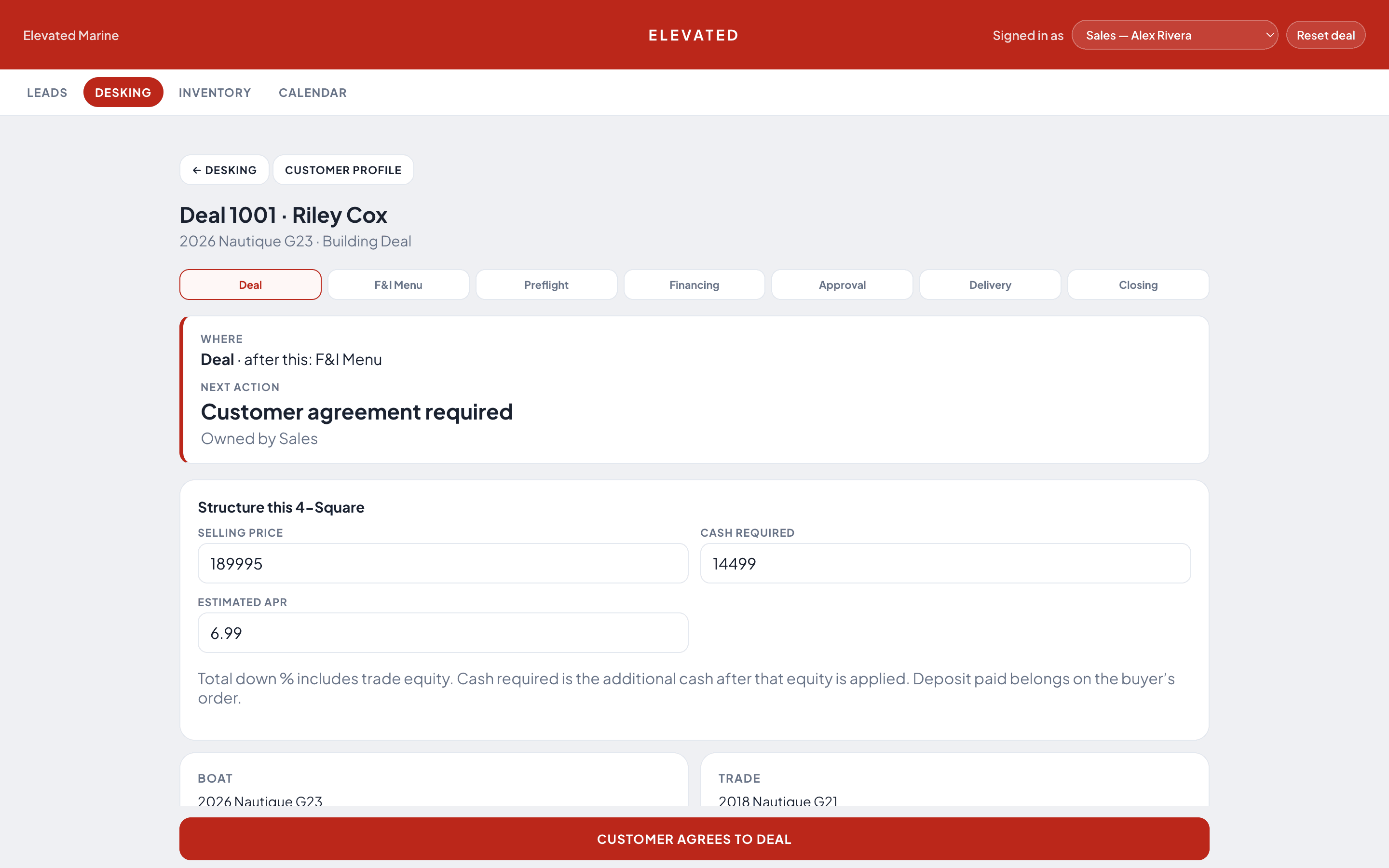
Capture web, phone, ad, and show QR leads without duplicates — repeat inquiries merge onto the existing Customer File and wake up dormant leads. Price in-stock or custom-order units with confidential dealer costlines, hand an iPad across the desk for guided 4-square and F&I protection selection, and transfer sold units cleanly onto the buyer's permanent Unit File.
- Lead routing, repeat-inquiry merge & Day-1 cadences
- Major-unit & bundled package inventory (VIN / HIN / serial)
- AI factory build-sheet & invoice PDF extraction
- PIN-protected Quick Quotes & QR window sticker PDFs
- 9-stage 4-Square Desking & tablet Customer F&I menu
- Trade appraisals, consignments & service-lane sourcing
- Off-site shows, demo days & mobile QR booth capture
- Shared Customer & Unit Files (household, ownership & RO history)
Shared core
Included with every $99 user seat
Lifetime Customer & Unit Files
Sales deals, service repair orders, and every conversation sit side by side on a 3-column customer profile with spouse and co-owner household linking. Every VIN/HIN/serial gets a permanent Unit File holding 5-slot walkaround photos, Primary / Co-Owner / Previous owner timelines that preserve service history across resales, serial and key codes, warranty dates, and saved-for-later jobs.
Guided arrival check-in on every visit
Every boat or unit arriving for service goes through the same phone-and-tablet check-in walkthrough: 5 canonical walkaround photo slots (reusing primary photos on return visits), fuel/hours/key verification, multi-point condition checks requiring photos and notes on any issue, and live OEM service bulletin matching.
Appointment calendar, two-way SMS & call logs
Color-coded Month, Week, and Mobile Day calendars layer drop-offs, pick-ups, mobile service, demos, deliveries, and staff time off — with 1-tap missed-appointment reschedule texts, shared SMS/MMS lines, group co-buyer threads, and call recordings with AI transcripts.
Native-feel phone & tablet workflows
Staff switch seamlessly between desktop monitors, showroom iPads, and lot or shop phones with dedicated mobile layouts, pinned bottom navigation, camera VIN/HIN capture, Stripe QR/SMS payment links, and post-visit review recovery.
Customer & Unit Files
Every household, every unit, and every check-in in one file
Sales history, active and past repair orders, saved-for-later service items, spouse and co-owner SMS threads, and AI call transcripts live together. When a boat or vehicle is sold to a new owner, its 5-slot walkaround gallery, serials, key codes, and check-in history stay intact on the permanent Unit File.
3-column Customer File
Sales deals, Service ROs, and Conversations (SMS, email, recorded calls & AI transcripts) side by side with spouse/partner household links.
5-slot Unit gallery
Port, Starboard, Bow, Stern & Interior slots plus HIN, Trailer VIN, Engine & Ignition Code records verified at arrival check-in.
Multi-owner timeline
Tracks Primary, Co-Owner, and Previous owners — transferring a sold unit preserves its lifetime check-in and service history without duplicates.
Saved for next service
Declined or deferred jobs stay pinned to the Unit File and surface automatically the next time that unit books an appointment.
Phones & tablets
Built for the service ramp, the lot, and the showroom desk
Your team is rarely sitting behind a desktop monitor. DealerAgent runs natively in the browser on iPhones, Android phones, and iPads — from camera check-ins and technician workboards to tablet F&I presentations and customer mobile approvals.
Dedicated Phone layout · Sales, Service & Managers
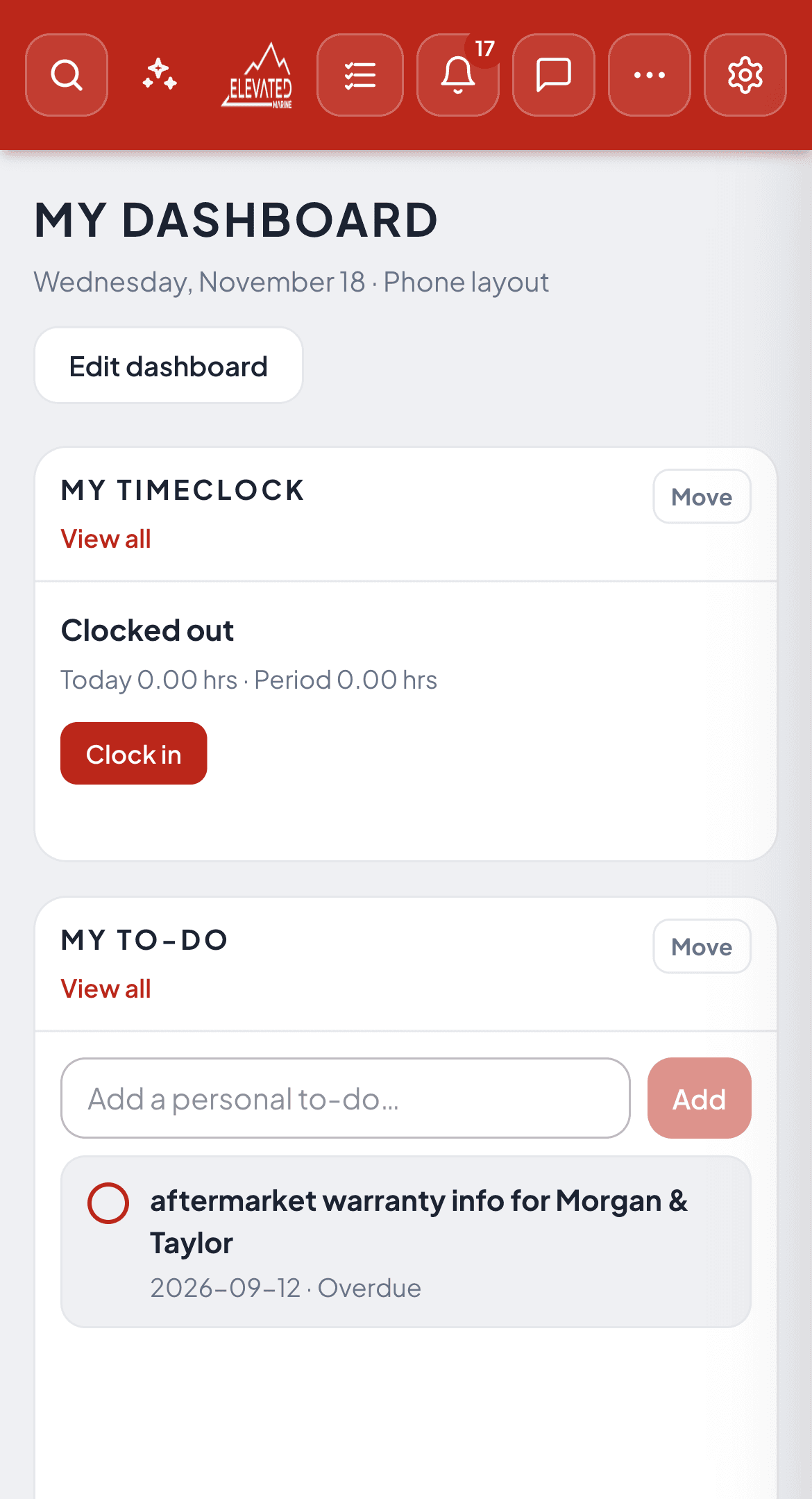
Separate Phone dashboard layout, timeclock & SMS
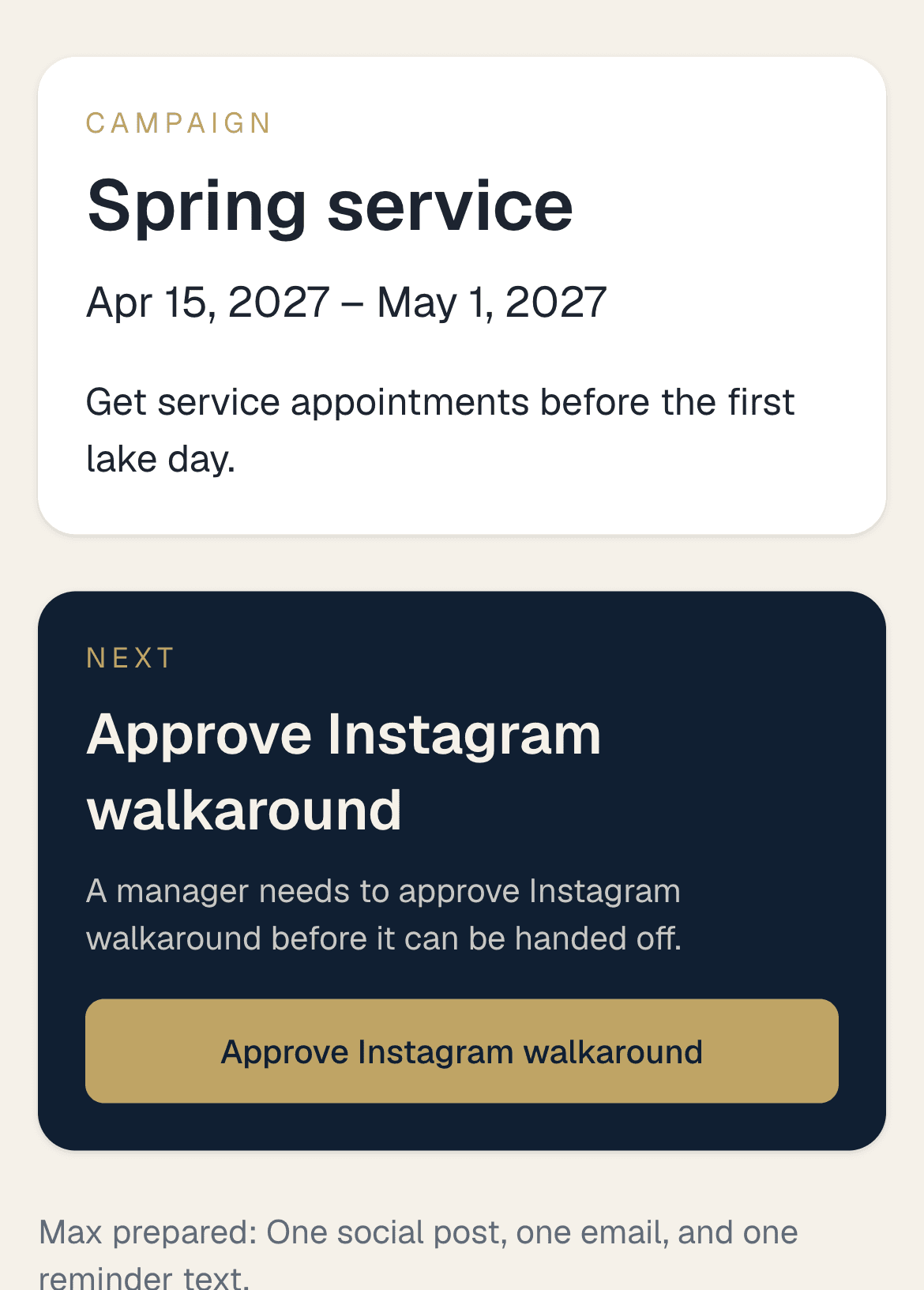
Every login saves a dedicated Phone dashboard layout independent of its desktop monitor — putting your Timeclock punch card, personal To-Do list, overdue follow-ups, recent SMS & call summaries, and campaign approvals one thumb-tap away.
- ✓Saved Phone layout separate from your desktop widget grid
- ✓Clock in, manage to-dos & answer customer texts from the lot
- ✓Approve multi-channel marketing campaigns on the go
Add-on
AI agents
$299 / month flat for the account
Six specialized dealership managers share one Command Center and one Work Case — drafting quotes, repair estimates, customer replies, SOP answers, and exception reviews while a person approves every store change.
Shared Work Cases
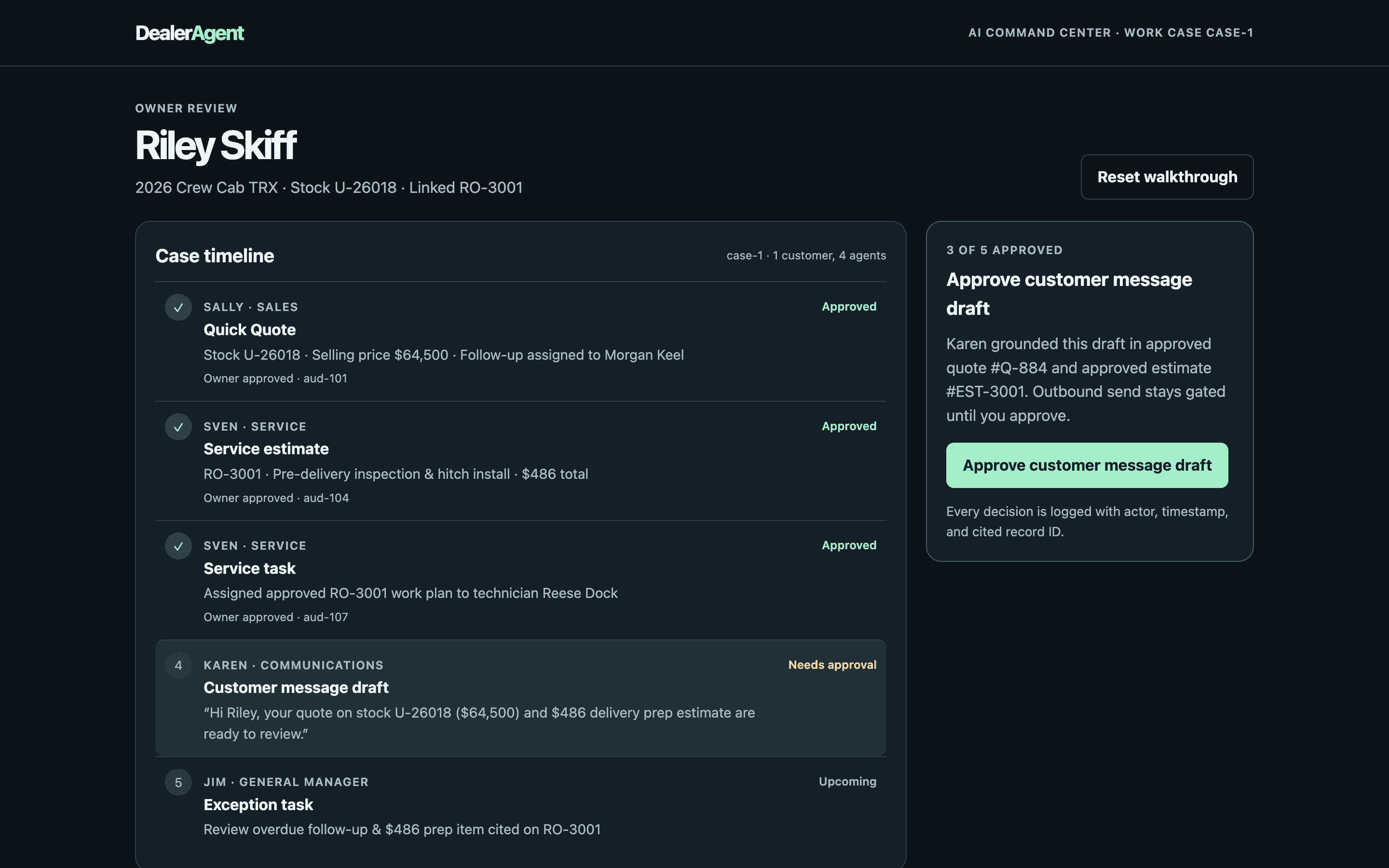
Instead of scattering alerts across four tabs, related work lands on one AI Work Case. Each case links the customer, the stock or customer-owned unit, the Quick Quote, the repair order, assigned staff tasks, message drafts, and cited evidence — exposing one clear Next Action with a named owner and due date.
Human-gated approvals
Server-side permissions enforce four risk tiers. Agents read scoped records and run math immediately, log low-risk internal follow-ups with idempotent keys, pause medium-risk CRM writes in Awaiting Approval, and hard-gate outbound texts, emails, financing, and pricing. No agent or requester can approve its own proposal.
Cross-agent handoffs
Sally's approved quote, Sven's pre-delivery or seasonal estimate, Karen's grounded customer message draft, and Jim's cited GM exception stay on the same case timeline. When signals conflict — such as high repair spend paired with a customer text saying they plan to keep their unit — confidence drops automatically instead of pushing unwanted sales outreach.
Sales
Sally
Builds real Quick Quotes by selling price or target margin using live inventory, fee and tax defaults, rebates, and trade equity — updating the same quote cleanly as deals evolve. Opens the rep follow-up on approval, ranks daily Next Best Actions, scores Opportunity Health, and spots 30-month or service-triggered upgrade windows.
Guardrail: Refuses sold units and below-costline prices, keeps dealer cost confidential, and never submits financing or sends a quote out on her own.
Service
Sven
Reads open repair orders, rewrites raw check-in complaints into structured tech verification steps, drafts itemized labor and parts estimates, and routes technician tasks once approved. Preps advisor pre-arrival briefs with prior declined-work memory and compares parts vendors by true landed cost against promised pickup dates.
Guardrail: Never messages the customer directly, alters an unapproved RO, pitches sales during a service visit, or places a supplier order without approval.
Communications
Karen
Composes customer SMS and email drafts strictly from verified quotes and approved service estimates on the work case — inserting explicit human-review flags if a figure is missing. Watches open threads in shop working hours to catch unanswered customer questions, missed staff promises, and sentiment drops.
Guardrail: Outbound send routes stay hard-gated; a person reviews and sends every message, and a quick reply never falsely closes an underlying follow-up task.
General manager
Jim
Audits overdue leads, aging repair orders, margin anomalies, and missed commitments across the dealership — requiring a cited record ID, observed timestamp, accountable owner, and dollar amount on every exception. Isolates concurrent sales and service cases for the same customer so decisions never bleed across departments.
Guardrail: Rejects uncited claims, never invents numbers, and waits for explicit owner or GM approval before creating corrective tasks.
Training & policy
Ed
Answers staff 'How do we do this?' questions strictly from approved dealership SOPs and manufacturer guides, citing the exact document, section, and version — abstaining and logging a Knowledge Gap when no policy covers it. Runs personalized ~12-minute daily lessons (Learn, AI role-play, server-graded quiz) and a manager Skill Map.
Guardrail: Enforces role-based document access, never fabricates store rules, and never changes employee roles, pay, or HR records.
Sales intelligence
Manny
Aggregates lead volume, sold units, conversion rates, and lot aging by model with transparent date windows and denominators — automatically deduplicating repeat inquiries from the same shopper so conversion math stays accurate. Proposes stocking and follow-up actions tied to real demand.
Guardrail: Read-only over pricing and accounting; never mutates live unit prices or inventory visibility autonomously.
Coming soon
Dealership OS
Dealership OS is a full-package dealer management system — built-in accounting, links to QuickBooks, Sage 50, and Xero, invoicing, parts ordering and receiving, geofenced timeclock, and payroll in one place.
Run your official books inside DealerAgent or sync cleanly with QuickBooks, Sage 50, Xero, and Lightspeed. Every front-counter module sold today already writes to the same customer, unit, repair order, and deal records, so stores upgrade into the full DMS with zero data migration.
Read about Dealership OS- 1Sales ModuleAvailable
- 2Service ModuleAvailable
- 3MarketingAvailable
- 4WebsiteAvailable
- 5AI agentsAvailable · add-on
- Dealership OSComing soon
Questions
Who is DealerAgent for?+
Major-unit dealerships — including automotive, powersports, RV, marine, trailer, heavy equipment, and agricultural stores — running one rooftop or a multi-store group.
How does pricing work?+
Sales, Service, and Marketing access is $99 per user each month — the same employee is never billed twice across departments, and your first rooftop is included. The public Website is $399 a month flat. Each additional rooftop is $299 a month, and the six-agent AI Command Center add-on is $299 a month flat for the entire account.
What do the AI agents do — and can they act without permission?+
Sally builds Quick Quotes and schedules sales follow-ups, Sven drafts repair estimates and shop tasks, Karen writes case-grounded customer texts and watches for unanswered threads, Jim cites overdue sales/service exceptions for the GM, Ed answers staff questions with exact SOP citations, and Manny reconciles model-level conversion and aging. They collaborate on one shared Work Case, and server-side guardrails require a person to approve quotes, estimates, tasks, and outbound messages before anything is saved or sent.
How are our dealership data and Legacy DMS history handled?+
Each dealership runs in an isolated tenant environment with role-based permissions and PIN-protected dealer costlines. Onboarding imports your existing customers, customer-owned units, active inventory, parts, and historical sales and service records from Lightspeed or CSV exports.
Is Dealership OS available today?+
Dealership OS — our full-package DMS with built-in accounting, QuickBooks/Sage 50/Xero links, invoicing, parts ordering and receiving, geofenced timeclock, and payroll — is in final rollout. Every module sold today already shares the same database foundation, so you can start now and turn on Dealership OS later without migrating.
How does annual billing work?+
Annual billing is ten months of the monthly price. Two months are included.